OSAP: Full-Time Application
OSAP's Full-Time application is available to students who take at least 60% of a full course load (a minimum of 1.5 academic credits each semester) or, for students with a permanent disability or a persistent or prolonged disability, 40% of a full course load (a minimum of 1.0 academic credits each semester) or students registered on a co-op work term. When calculating course load for OSAP purposes, do not include co-op work term credits.
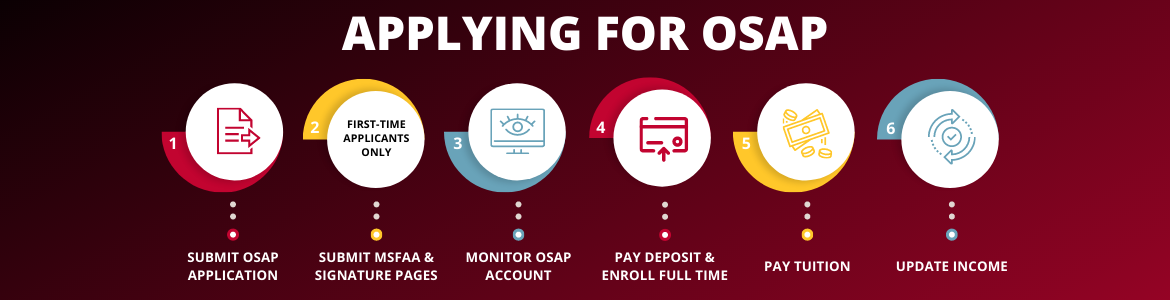
Step 1: Submit an OSAP Application
- Apply online for OSAP. If you’re a first-time applicant, you will need to create a profile (by clicking “Register”). All students need to start a new application each year.
- Apply early! We recommend you apply online by June 30 to ensure that you receive your funding in time for the fall semester.
Step 2 (First-Time OSAP Applicants Only): Complete your MSFAA Online and Upload your Declaration and Signature Pages
- Complete your Master Student Financial Assistance Agreement (MSFAA) online through a two-step process. You will need your 10-digit MSFAA number, which you can find in your OSAP account.
- Print and sign your Declaration and Signature pages for yourself, your parents, or your spouse (if applicable). Upload them on the OSAP website.
As long as there is no break in your studies, or changes in your parental or spousal information, your MSFAA and signature pages will remain valid during your entire academic career.
Step 3: Monitor and Follow Through!
- After you submit all of your paperwork, it is important to check your status through the OSAP account. The status will show if anything is missing. You can also learn how much funding you’ll be receiving!
- If the status shows 'Confirmation of Enrolment' required, then everything is complete, and OSAP is waiting for the school to process confirmation of your enrolment. This can only occur if you complete Step 4.
Step 4: Pay the Registration Deposit and Register for Courses
- Register for at least 1.5 academic credits (or at least 1.0 academic credits for students with a permanent disability or a persistent or prolonged disability; a co-op work term credit does not count) and, if you're an undergraduate student entering the Fall semester, pay the Registration Deposit before the deposit deadline.
- Student Financial Services will electronically confirm to the Ministry that you are enrolled as a full-time student. The Confirmation of Enrolment process begins in late August.
Step 5: Pay your Tuition Fees
- Your OSAP funding will be sent directly to the school to pay your tuition, residence, and compulsory fees.
- It is your responsibility to monitor your student account to ensure that all fees owing are received by the University of Guelph by the payment deadline date. If additional funding remains, after your fees are paid, it will be transferred directly to your bank account.
- Information regarding fee payment, acceptable payment methods, and deadlines is available on the Student Financial Services website.
Step 6: Confirm your Income
- It is important to accurately report your income, because it can impact your eligibility for additional aid.
- All income, including part-time jobs, GRA, and/or GTA earnings must be reported.
- Please check your award income and make sure that you have not reported any UofG scholarships and bursaries.
- The University of Guelph will report all UofG scholarships or bursaries to OSAP on your behalf.
If you need to make changes to your income information before the online confirmation is available, please complete an OSAP income change form and submit it to our office. The forms are available by contacting our office:
Student Financial Services, University of Guelph
3rd Floor, University Centre
Guelph, ON N1G 2W1
T: 519-824-4120 ext.58715
Email: finaid@uoguelph.ca
Changes to your OSAP assessment can be viewed through your OSAP account online as soon as we have processed your request.
OSAP for the Summer Semester
Students who have received OSAP for the Fall and/or Winter semesters (of the current year) should complete an OSAP Summer Extension Form to extend their OSAP through the summer. The OSAP Summer Extension Form is available online. We must receive this form by the end of March to have your OSAP funding available for the start of summer classes.
If you did not complete the OSAP Full-Time application during the fall or winter semesters, you must start a new OSAP application on the OSAP website for the summer semester. If you are taking a part-time course load during the summer (less than 60% load), then you may visit the OSAP website and apply using the OSAP Part-Time application for summer funding. When calculating course load for OSAP purposes, co-op work term credits are not included.
OSAP: Part-Time Application
OSAP is available to students who take less than 60% of a full course load (less than 1.5 academic credits) or students on a co-op work term who are also registered for less than 1.5 academic credits. Under the Part-Time OSAP application, students receive funding for tuition, books and local travel, but not for living costs. Students with a permanent disability or a persistent or prolonged disability, who are taking 40% of a full course load (1.0 academic credits), have the choice to apply for OSAP using either their full or part-time application. When calculating course load for OSAP purposes, co-op work term credits are not included.
Step 1: Apply Online
- Apply online each semester by the deadline date.
Step 2: Print, Sign, and Submit Supporting Documents
- After submitting your application online, you must print and sign your, and your spouse's (if required), Declaration and Signature pages.
- Submit the Declaration and Signature pages along with any required supporting documents to Student Financial Services, 3rd floor UC or upload them directly through your OSAP account.
Step 3: Check Status
- Check your loan status by logging into your account on the OSAP website.
Step 4: Pay your Tuition Fees
- When your application is confirmed, your fees will be assigned directly to the school to pay your tuition and fees.
- If your funding does not arrive in our office in time to meet the payment deadline, you should make an arrangement to pay your fees.
- Information regarding fee payment, acceptable payment methods and deadlines is available on the Student Account website.