



IN120 indicator LED status
Wireless door indicator LED status explanation
The information contained within and linked to this web page is provided to the Electronic Access Admins, Managers and Maintenance personnel. Documents are for reference purposes only, and are subject to change without notice. Contact the ELECTRONIC ACCESS GROUP eaccess@uoguelph.ca with any questions or concerns.
The ASSA ABLOY IN120 wireless door lock features an exterior iClass card reader. 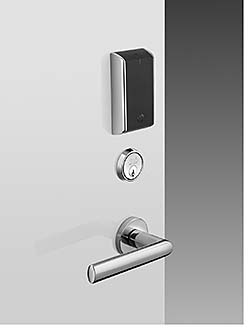
An indicator LED is present on the top face of the card reader.
Below is an explanation of door operation, referencing the indicator LED during a credential read.
Access LED - Modes
No LED indicator:
- Batteries in the lock are dead. Contact eaccess@uoguelph.ca , or the Physical Resources Workorder desk at x53854
- Card is damaged. Obtain a new card.
- ID card does not contain iCLASS technology. Obtain a new card.
Red indicator LED:
- Access to the door is denied to the credential
- Door is currently in scheduled unlock mode (try to open the door with the door handle)
- Reader has detected multiple iClass technology cards. Present just 1 card to the door.
Green indicator LED:
- Access is granted
Battery Status - LED modes
Blue indicator LED:
- Batteries are low, change immediately. Contact eaccess@uoguelph.ca , or the Physical Resources Workorder desk at x53854
Yellow indicator LED:
- A rare battery condition issue. Contact eaccess@uoguelph.ca , or the Physical Resources Workorder desk at x53854